Communication Center

Club Automation Communication Center
The Club Automation Communication Center serves as an integrated messaging hub within the application, enabling staff to seamlessly communicate with members, guests, and fellow team members. This feature empowers users to send emails, SMS messages, and push notifications directly from the platform. Additionally, users can conveniently access a log detailing the history of each message sent.
Supported by Club Automation's robust reporting capabilities, the Communication Center offers unparalleled functionality in tailoring communications for specific target groups. This ensures that staff can deliver personalized and targeted messages effectively, enhancing the overall user experience.
Interviews
Customer Interviews
Having recognized the significance of this request over the years, we diligently compiled a comprehensive list of individuals who had expressed interest in it. Taking proactive steps, we engaged with approximately 20 customers, conducting thorough interviews with 9 of them. These customers, recognized as heavy users of the communication center, provided invaluable insights into their usage patterns and highlighted the features they found most impactful.
Our foremost goal throughout these interviews was to actively listen to our customers, gaining deep understanding of their utilization of the communication center. We sought to refine and enhance the user experience to better meet their needs.
Findings

3 areas of high need
Consistently, customers expressed concerns about three pivotal aspects of the communication center, significantly affecting user experience. Users encountered challenges in accessing accurate message logs, often requiring navigation across various system sections. Additionally, the process of composing messages lacked clarity and intuitiveness, further compounding user frustration.
Utilizing Pendo, I conducted thorough analysis of page traffic and user engagement metrics, shedding light on the extent of impact across different features. By leveraging these insights, we gained a clearer understanding of our priorities for application improvement, enabling us to strategically address the most pressing user needs. By prioritizing we were able to determine the phases of the project as 1,2 and 3.
Old vs. New Designs


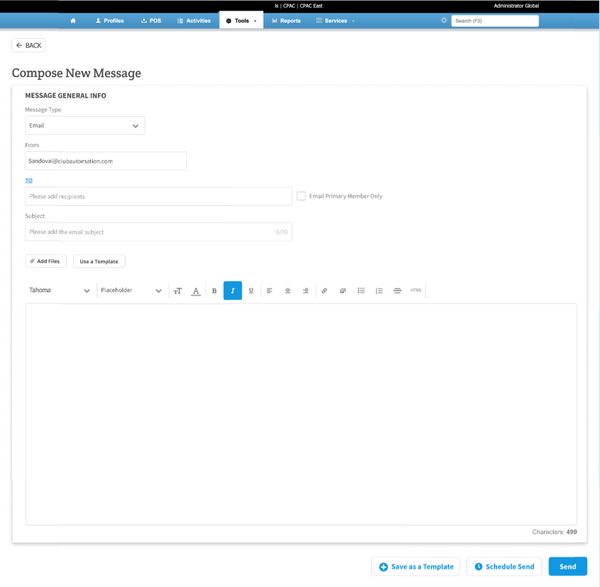


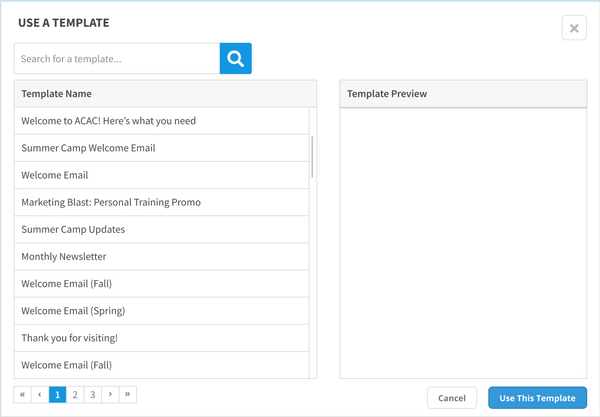
"Following insightful interviews with customers, a clear objective emerged: we aimed to introduce subtle enhancements that would not only delight our customers but also elevate adoption rates. Through numerous customer feedback sessions and internal stakeholder meetings to review designs, we refined our goals, ensuring alignment with user needs and expectations. The resulting designs were met with enthusiastic approval and deemed ready for development. Our goals included:
-
Creating an attractive, intuitive flow for viewing historical messages and composing communications.
-
Implementing mobile responsiveness to enhance accessibility across devices.
-
Ensuring platform UI consistency for a seamless user experience.

Development

Phase 1
Recognizing that the message history section serves as the starting point for all our customers' journeys within the communication center, we prioritized implementing the new designs on this page initially.
Moreover, it marked the inaugural integration of the React UI kit by our engineers, mobile responsive screen to this page all of which signaled a significant milestone in our development process.
Phase 2
The following phase of our release involved updates to composing a new message. Notably, this marked the first instance where customers encountered a mobile-responsive screen, facilitating a more intuitive understanding of how to compose messages.


Phase 3
Due to the lack of intuitiveness in the old messaging center, users frequently relied on templates to expedite actions. Although less pressing with the introduction of the new and improved communication center, addressing this issue remained a priority for users. To address this need, we revamped the template management system, enabling users to effortlessly search for and manage templates in a more intuitive and user-friendly manner.
We initially launched the first phase of this project to a handpicked group of beta gyms and conducted individual follow-ups to gauge their feedback. The response was overwhelmingly positive, with customers expressing appreciation for the enhanced UI, which elevated the Club Automation experience.
Remarkably, we observed a significant 100% decrease in negative NPS scores related to communication center issues and feature requests. This improvement underscored the positive impact of the feature on user satisfaction and product performance.
This standout feature truly distinguishes Club Automation from its competitors, propelling the product to outperform its rivals. Following the release of this feature, our sales team saw a substantial increase in ARR, with several hundred thousand dollars in bookings.